


Many companies invest millions in engineering talent but still struggle with slow releases. The missing piece is often not people or process.
Many CTOs still deal with deployments that take weeks, manual testing cycles that slow down innovation, and production bugs that appear after every release. Meanwhile, companies with mature DevOps practices deploy multiple times per day with minimal risk.
The difference usually comes down to one thing: a well-designed CI/CD pipeline.
In this blog, we have simplified CI/CD pipeline. We will discuss how it works, which tools power it, and how CTOs can use it to accelerate delivery without sacrificing reliability.
What is CI/CD?
CI/CD stands for Continuous Integration and Continuous Delivery (or Continuous Deployment).
A CI/CD pipeline is an automated process that builds, tests, and deploys software whenever developers update code. Instead of waiting weeks for manual releases, changes move through automated stages such as build, testing, and deployment, enabling faster and safer software updates.
This DevOps approach helps teams ship features quickly while reducing release risk.
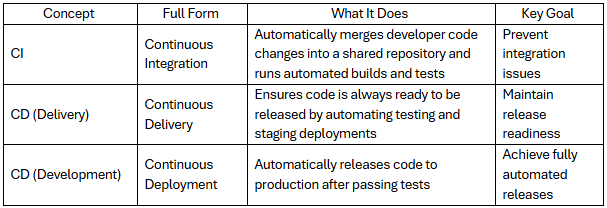
CI vs CD vs CD: Table of Distinctions
The acronym CI/CD often confuses even experienced leaders because it combines multiple concepts. Understanding the distinction helps CTOs design the right delivery strategy.
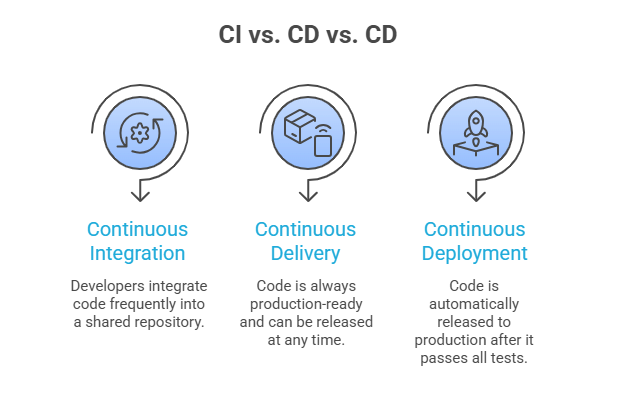
Simple way to think about it
Why CI/CD Matters for CTOs in 2026
In 2026, the pressure to ship faster has intensified due to AI-driven product cycles and continuous feature updates.

For CTOs responsible for product velocity and engineering efficiency, CI/CD is now foundational infrastructure rather than an optional improvement.
How a CI/CD Pipeline Actually Works
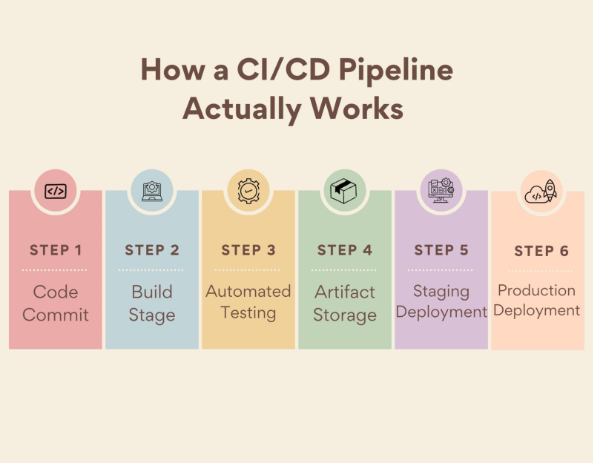
A CI/CD pipeline automates the journey from code commit to production release.
Although pipelines vary between organizations, most follow six core stages.
1. Code Commit
Developers write code and push changes to a shared repository such as GitHub or GitLab.
Each commit triggers the CI/CD pipeline automatically.
Key actions:
- Version control tracking
- Code collaboration
- Automated trigger of pipeline
2. Build Stage
The build stage compiles code and prepares the application for testing.
Typical tasks include:
- Compiling code
- Installing dependencies
- Packaging the application
Output:
A build artifact such as a container image or deployable package.
Without automated builds, teams often spend hours resolving environment inconsistencies.
3. Automated Testing
Testing ensures that new code does not break existing functionality.
CI/CD pipelines typically include multiple testing layers:
- Unit tests
- Integration tests
- Security scans
- Performance checks
Automated testing is critical because it allows teams to detect issues immediately rather than after release.
4. Artifact Storage
Once testing passes, the build artifact is stored in a registry or artifact repository.
Examples include:
- Docker registries
- Artifact repositories
- Package registries
This ensures the same artifact moves through staging and production environments without modification.
5. Staging Deployment
The application is deployed to a staging environment that mirrors production.
Teams perform:
- Final validation
- User acceptance testing
- Performance monitoring
Staging environments help identify environment-specific issues before public release.
6. Production Deployment
If all checks pass, the application is released to production.
Deployment strategies often include:
- Blue-green deployment
- Canary releases
- Rolling updates
These strategies minimize downtime and allow rapid rollback if problems appear.
Common CI/CD Mistakes (By Pipeline Stage)
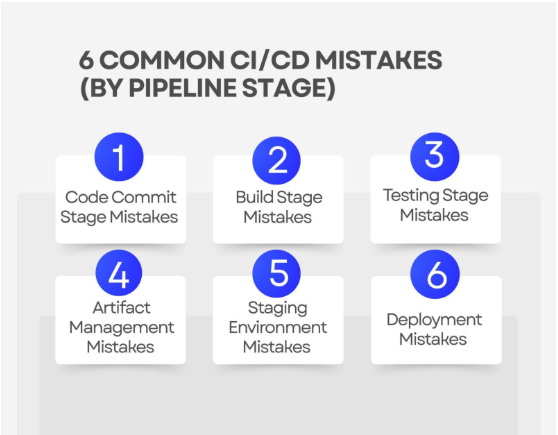
Many organizations implement CI/CD but fail to achieve expected speed improvements due to avoidable mistakes. Let’s understand them in detail.
1. Code Commit Stage Mistakes
Problem: Large infrequent commits
When developers commit code in large batches, integration conflicts increase.
Best practice: Encourage small, frequent commits.
2. Build Stage Mistakes
Problem: Environment inconsistency
Builds fail when dependencies differ between machines.
Best practice: Use containerized builds with Docker.
3. Testing Stage Mistakes
Problem: Over-reliance on manual testing
Manual testing slows pipelines significantly.
Best practice: Automate unit, integration, and regression testing.
4. Artifact Management Mistakes
Problem: Rebuilding artifacts for each environment
This introduces inconsistencies.
Best practice: Promote the same artifact across environments.
5. Staging Environment Mistakes
Problem: Staging environment differs from production
This leads to unexpected production failures.
Best practice: Maintain staging environments identical to production infrastructure.
6. Deployment Mistakes
Problem: Deploying directly to production
This increases risk and downtime.
Best practice: Use gradual deployment strategies such as canary releases.
CI/CD ROI: DORA Metrics Explained
To measure the success of DevOps adoption, many CTOs rely on DORA metrics.
DORA stands for DevOps Research and Assessment, a research group that studied thousands of engineering teams.
The framework identifies four key performance indicators.
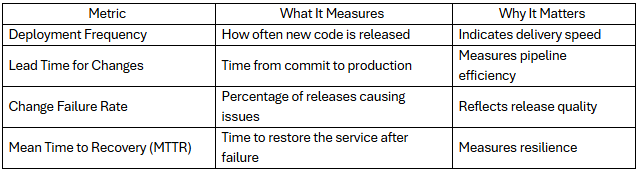
High-performing engineering teams typically achieve:
- Multiple deployments per day
- Lead times under one hour
- Low failure rates
- Rapid incident recovery
Tracking these metrics helps CTOs justify investment in DevOps automation.
When to Hire a CI/CD Specialist vs Do It In-house
Implementing CI/CD can be done internally, but many companies struggle due to architectural complexity.
Here is a simple framework for deciding.
DIY CI/CD Implementation
Suitable when:
- Engineering team already has DevOps expertise
- Infrastructure is relatively simple
- Deployment frequency is low
Typical setup:
- Basic CI pipelines
- Automated testing
- Manual production approval
Hiring CI/CD Specialists
Recommended when:
- Systems involve microservices or Kubernetes
- Multiple engineering teams collaborate
- Releases must occur frequently
- Security and compliance requirements are strict
Experienced DevOps engineers help design:
- Scalable pipelines
- Automated infrastructure
- GitOps workflows
- Observability systems
For many organizations, working with DevOps service providers accelerates implementation and avoids costly architectural mistakes.
Final Thoughts
Modern software organizations cannot rely on slow, manual release processes. As digital competition intensifies, product velocity becomes a strategic advantage.
A well-designed CI/CD pipeline allows engineering teams to integrate code continuously, automate testing, and deploy updates with confidence. The result is faster releases, improved reliability, and a more productive development culture.
For CTOs evaluating DevOps investments in 2026, CI/CD is not just a technical upgrade. It is a foundational capability that determines how quickly your organization can innovate.