



Most CMS platforms lock you with a template. Strapi does the exact opposite.
As a headless CMS, Strapi separates content from presentation, making it ideal for modern websites, apps, and multi-channel experiences, which is why businesses are increasingly investing in Strapi CMS development services.
For brands this means faster go-to-market, easier integrations, and the ability to deliver consistent experiences across web, mobile, and emerging platforms.
Whether you are re-platforming, building a scalable content hub, or enabling your marketing team to move faster, understanding how Strapi works is critical.
In this blog, we break down its architecture, setup process, and help you evaluate whether Strapi is the right fit for your growth plans.
What Is Strapi CMS?
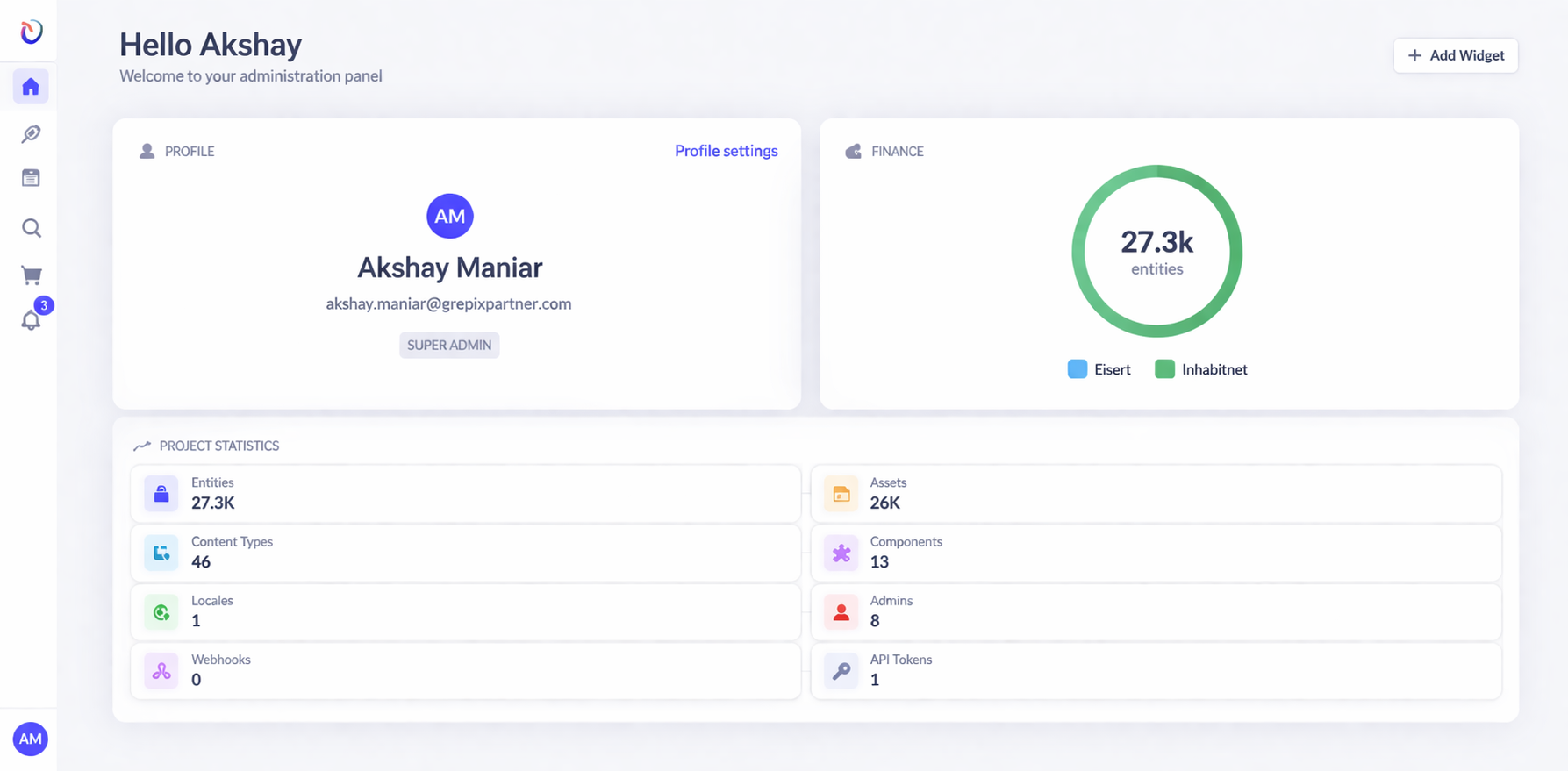
Strapi is an open-source headless content management system that gives development teams full control over how content is structured, managed, and delivered.
Unlike traditional CMS platforms that lock content to a single frontend, Strapi exposes content through APIs, making it available to any channel or application your business runs. This flexibility is a key advantage offered by headless CMS solutions like Strapi.
It is built for businesses that need to deliver content at scale, across multiple platforms, without being constrained by the limitations of their CMS.
Organisations including IBM, Walmart, and NASA use Strapi to power their content operations because of the flexibility it offers.
How Strapi Works: Architecture Explained Simply
“With Strapi, we can be sure that the solution can be customised to always fit our needs. It helped us reduce time-to-market and deliver the project on time.” - Michal Pawlowski, Head of Software Development at Tesco Technology.
Understanding Strapi's architecture does not require a deep technical background. The core concept is straightforward: Strapi separates where your content lives from where it is displayed.
In a traditional CMS, the backend and frontend are tightly coupled. Change one, and you risk breaking the other. Strapi eliminates this dependency entirely.
The Three Layers of Strapi
Content Layer: Your content editors manage everything through Strapi's admin panel. They create, edit, and publish content without writing a single line of code.
API Layer: Strapi exposes that content through REST or GraphQL APIs. Any application that can make an API call can consume your content.
Delivery Layer: Your website, mobile app, customer portal, or third-party integration receives the content and renders it however it needs to.
The practical result is that your content team works independently of your development team. A redesign of your website does not require a CMS migration. A new mobile app does not mean rebuilding your content infrastructure.
Strapi vs Traditional CMS: Which Is Right for Your Business?
The honest answer is that neither is universally better. The right choice depends on your content complexity, your team's technical capacity, and where you plan to deliver content over the next three to five years. Let’s understand what each of them offer to your business:
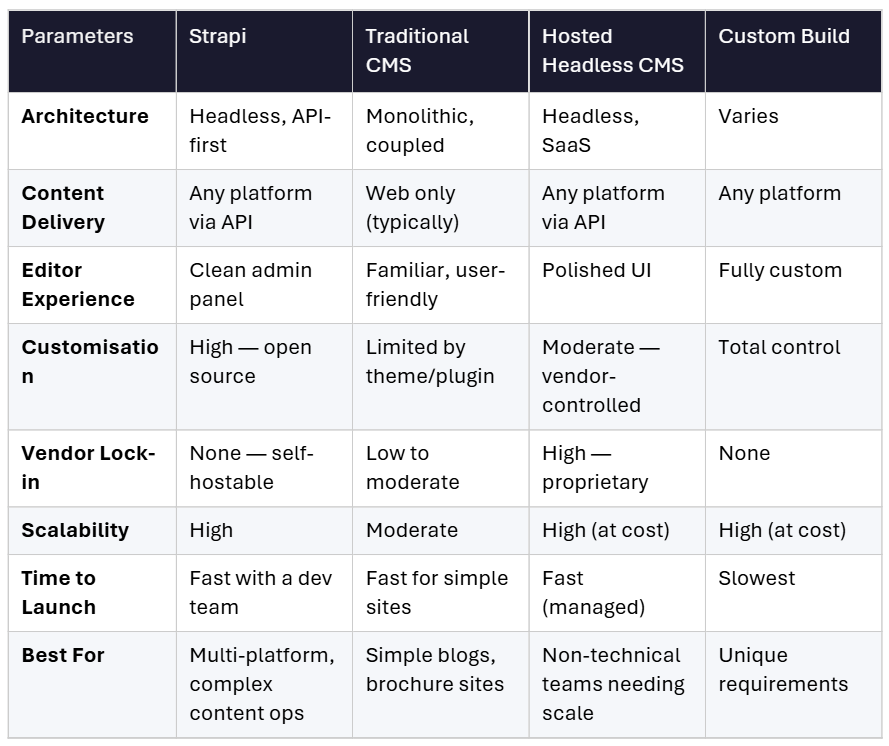
Traditional CMS platforms remain a sensible choice for straightforward websites with a single content channel and a non-technical team managing everything.
The moment you need to deliver content beyond a single website, or your team starts hitting the ceiling of what your current platform allows, the case for Strapi becomes a compelling option, especially for businesses looking for custom Strapi CMS implementation
What Strapi Makes Possible: Core Capabilities Explained
Rather than walking through Strapi's technical architecture feature by feature, it is more useful to understand what each capability enables for your business.
Content Types: Structure Content Your Way
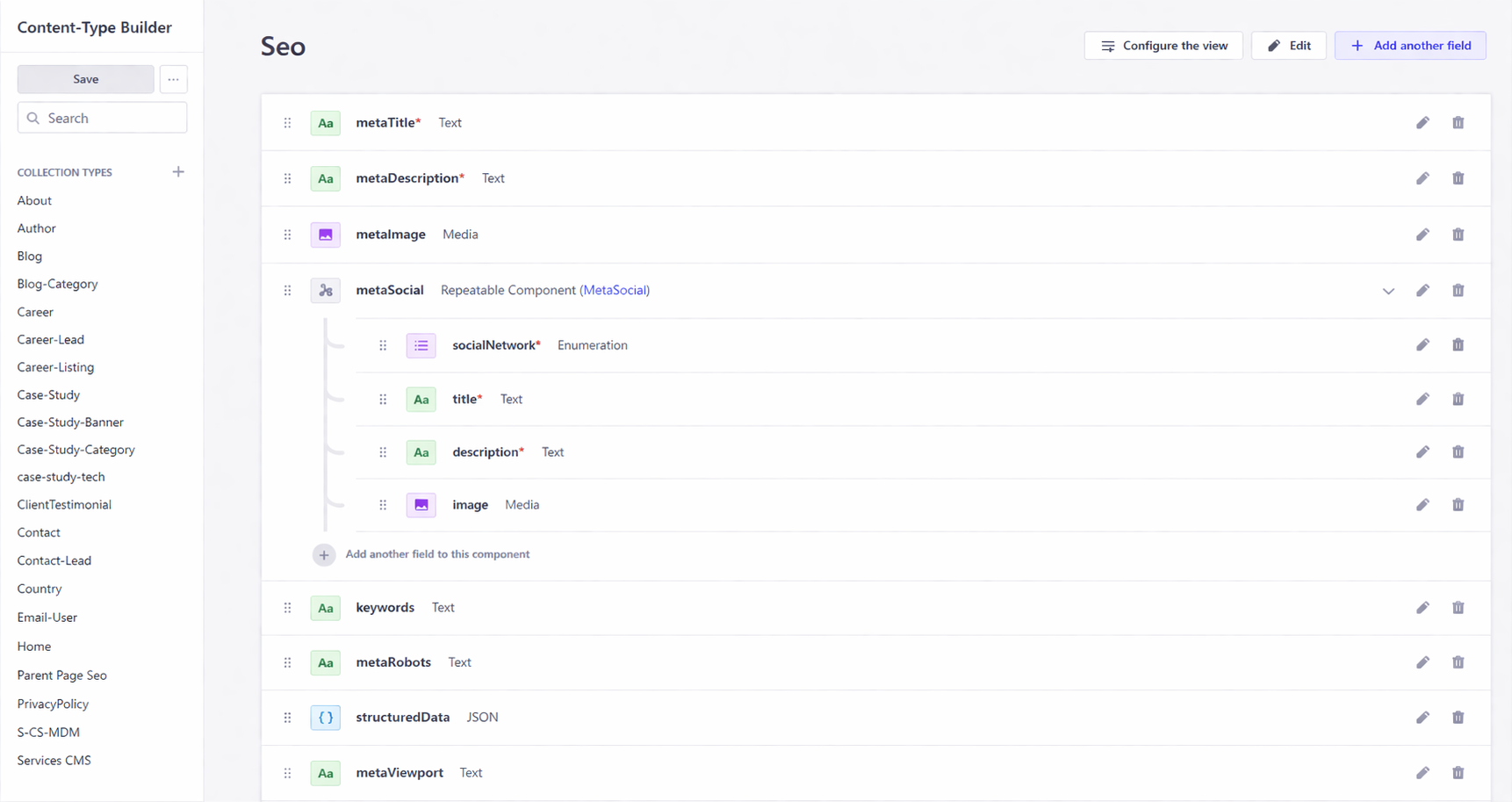
Strapi lets you define exactly what your content looks like. A product listing, a blog post, a financial report, and a customer profile all have different fields and relationships. Content types let your team model each one precisely, without being forced into a template someone else designed.
For enterprise and eCommerce teams, this means content structure matches business logic, not the other way around. This is particularly valuable in enterprise and eCommerce CMS solutions.
REST and GraphQL APIs: One Source, Every Channel
Once content is in Strapi, it can be delivered anywhere. Your website, your mobile app, your internal portal, and your third-party integrations all pull from the same source. There is no duplication, no inconsistency, and no need to update content in multiple places. This is why businesses adopt API-first CMS development strategies
Roles and Permissions: Your Team, Your Rules
Strapi's role-based access control means your marketing team can publish content without ever touching the codebase. Your development team controls what they can access and modify. Compliance teams can audit who changed what and when. Each team operates within its own defined boundary.
Strapi AI: Content Modelling at Speed
Introduced in 2025, Strapi AI allows developers and technical leads to generate content types and data structures directly from natural language prompts or uploaded designs. What previously took days of back-and-forth between stakeholders and developers can now be done in hours. For businesses where time-to-launch matters, this is a meaningful operational advantage.
What a Strapi Project Actually Looks Like
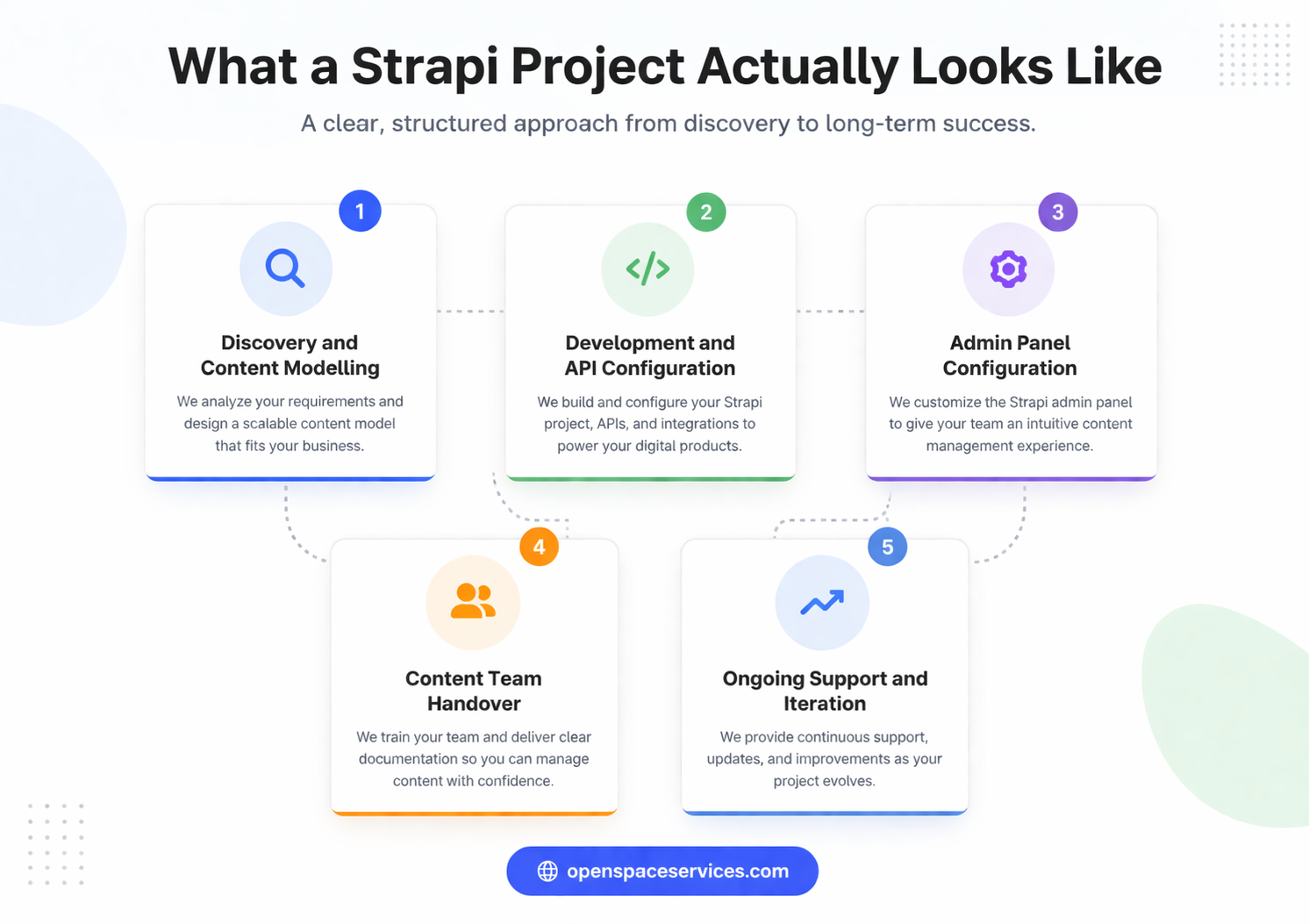
If you are evaluating Strapi for your business, it helps to understand what the implementation journey looks like in practice, not just in theory. Here is how a typical Strapi engagement unfolds when working with a specialist development team such as experienced providers of Strapi CMS development services
Stage 1: Discovery and Content Modelling
Before a line of code is written, the content structure is mapped. What types of content does your business manage? What relationships exist between them? How does your team work today, and how should it work after launch? This stage defines the entire project.
Stage 2: Development and API Configuration
Your development team builds out the content types, configures the APIs, and integrates Strapi with your frontend framework. Strapi works natively with Next.js, React, Vue, and most modern frontend stacks, as well as eCommerce platforms and third-party tools your business already uses.
Stage 3: Admin Panel Configuration
The admin panel is configured for your specific team. Roles are defined, workflows are set up, and the interface is tailored so non-technical users can manage content confidently from day one.
Stage 4: Content Team Handover
Before go-live, your content team is trained on the platform. The goal is full operational independence: your team manages content, your developers focus on building, and the two workflows do not interfere with each other.
Stage 5: Ongoing Support and Iteration
Post-launch, the system evolves with your business. New content types are added, integrations are extended, and performance is monitored. A well-implemented Strapi project should reduce your dependence on developers for day-to-day content operations, not increase it.
A Note on Hosting
Local development: For building and testing. No infrastructure required.
Self-hosted: Full control over your infrastructure. Best suited for enterprises with existing DevOps capacity or data residency requirements.
Strapi Cloud: Managed hosting with automatic scaling, backups, and a 99.9% uptime SLA. A faster path to production for teams without dedicated infrastructure resource.
Is Strapi Right for Your Business? A Quick Diagnostic
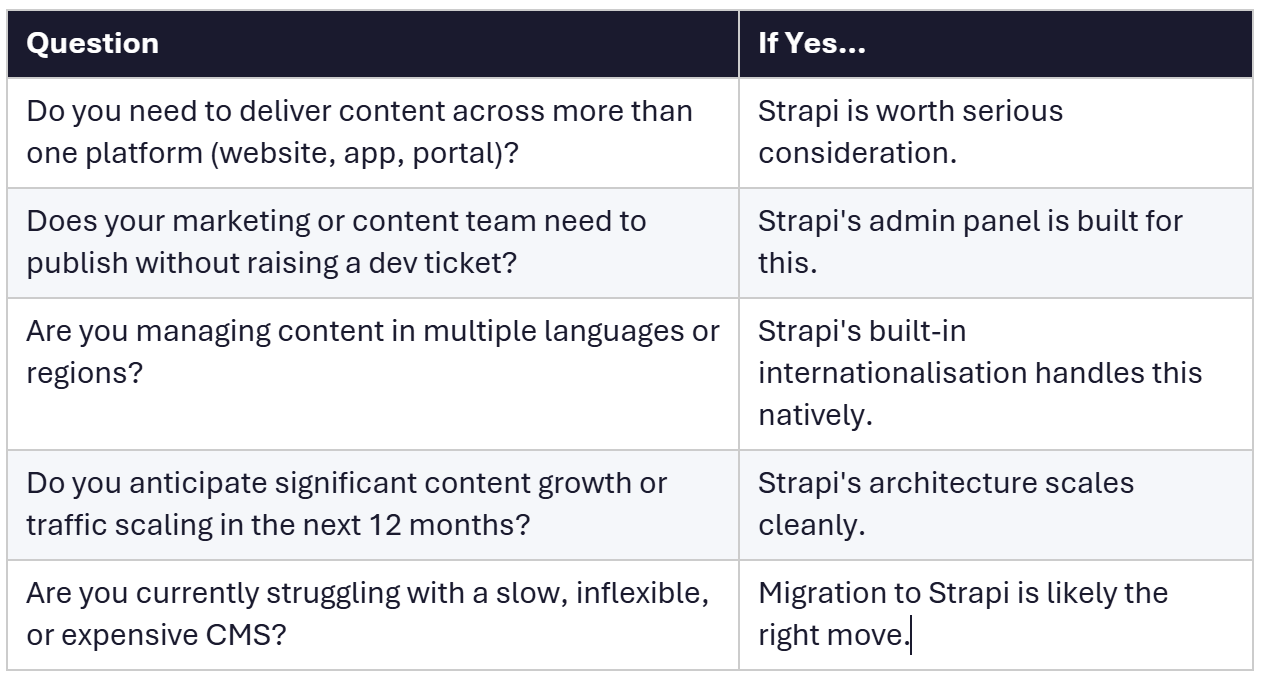
If you answered yes to three or more of these questions, Strapi is likely the right architectural choice. At this stage, consulting a team offering Strapi implementation and consulting services can help validate your approach.
Common Mistakes Businesses Make with Strapi
These are not developer mistakes. They are business and project mistakes that cause Strapi implementations to underdeliver, and they are entirely avoidable.
1. Starting Without a Content Structure Plan
Strapi gives you complete freedom to model your content. That freedom is an advantage when used thoughtfully and a liability when it is not. Teams that begin development without mapping their content types, relationships, and editorial workflows often end up rebuilding significant portions of the project midway through. Discovery is not optional.
2. Underestimating the Need for Ongoing Developer Support
Strapi reduces the day-to-day involvement your content team needs from developers. It does not eliminate the need for development resource entirely. New integrations, plugin updates, API changes, and performance work still require technical involvement. Factor this into your resource planning before you go live.
3. Migrating Without Auditing Existing Content
Moving from a legacy CMS to Strapi without auditing your existing content first is one of the most common causes of project delays. Content that is inconsistently structured, duplicated, or simply outdated creates significant extra work during migration. A content audit before the project begins saves time, cost, and frustration.
4. Not Planning for the Content Editor Experience
Strapi's admin panel is intuitive, but it is not a plug-and-play solution for every team. The way roles, permissions, and content types are configured has a direct impact on how easily your non-technical team can use the platform. If the editor experience is not considered during setup, you will hear about it after launch.
5. Treating Strapi Like a Traditional CMS After Launch
Strapi is not a WordPress replacement. It does not work the same way, and teams that approach it with a traditional CMS mindset will either underuse it or create unnecessary complexity. The value of Strapi comes from embracing its API-first architecture, not from trying to replicate the workflows of the platform you left behind.
Conclusion
The CMS decision is not a technical one in isolation. It is a business decision about how your team works, where your content needs to go, and what your digital operations should look like in three years, not just today.
Strapi gives businesses the architectural foundation to manage content across any channel, maintain operational independence between content and development teams, and scale without being held back by the platform they are running on.
The question is not whether Strapi is a capable system. The question is whether your business is ready to use it and whether you have the right partner to build it properly.
Ready to explore Strapi for your business?
Openspace Services works with eCommerce brands, fintech companies, and enterprise organisations to design, build, and support Strapi implementations that are built to last. If you are ready to move past a platform that is holding you back, let us talk. Get in touch with us TODAY!